> ## Documentation Index
> Fetch the complete documentation index at: https://developer.dromo.io/llms.txt
> Use this file to discover all available pages before exploring further.
# Webhooks
> You can use webhooks to get notified when your users complete an import using Dromo.
Dromo provides two kinds of webhooks:
* **Managed Webhooks** are managed in the Dromo dashboard. They provide context about the completed import, and can be applied to multiple schemas.
* **Basic webhooks** are configured by setting the [webhookUrl setting](/reference/settings/settings#webhookurl) in your import settings. This webhook can be configured dynamically at the time of import.
## Managed webhooks
Managed webhooks are configured in the dashboard on the [webhooks page](https://dashboard.dromo.io/webhooks). Click on the "New webhook" button to create your first webhook.
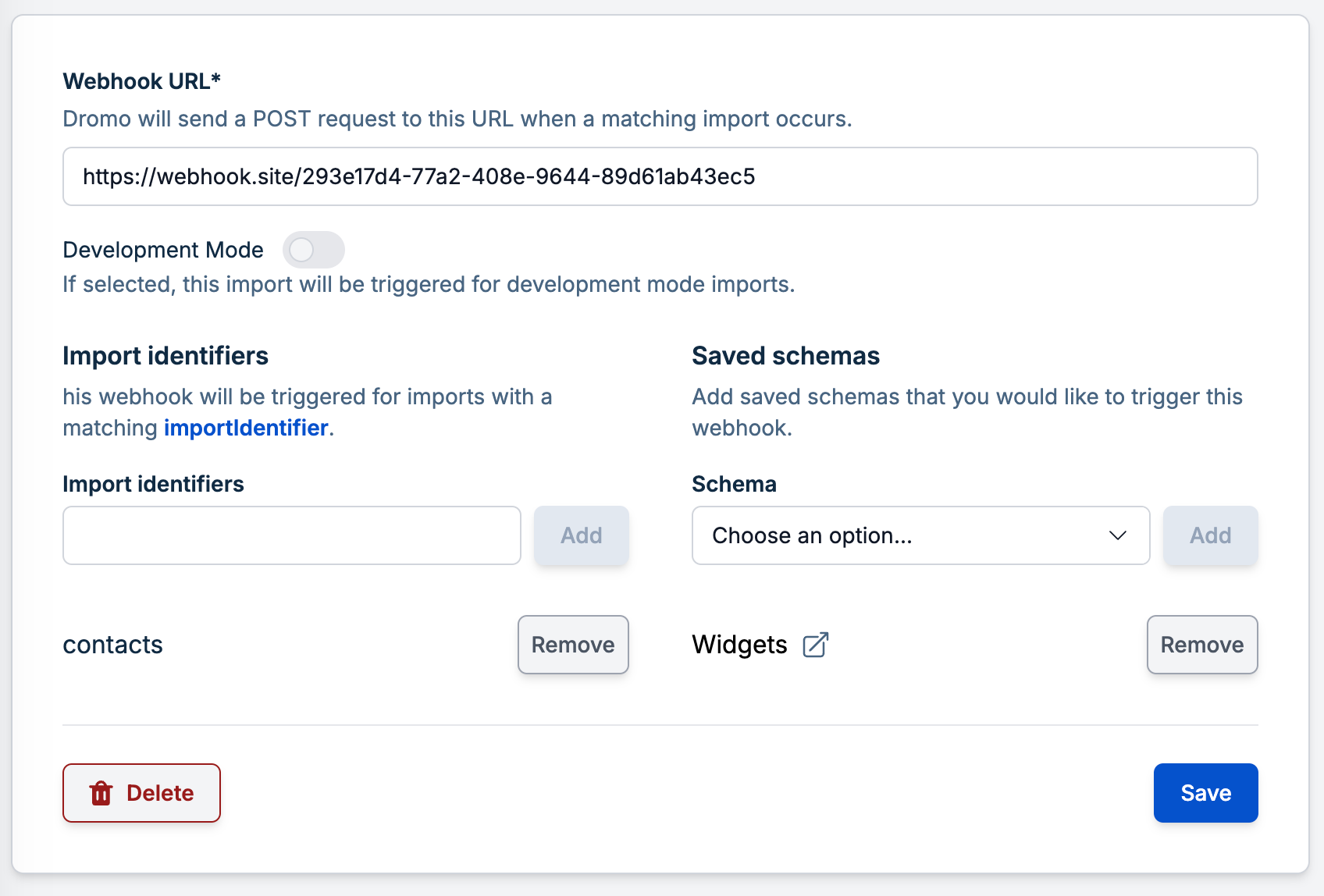 There are a few things to specify:
* **URL**: Provide a publicly accessible URL where the webhook should be sent.
* **Development Mode**: Toggle this setting to control whether the webhook fires for development imports or production imports, based on the developmentMode flag. This is helpful for testing webhooks in staging environments.
* **Schemas to Trigger On**: Choose when the webhook should be triggered using either or both of the following:
* **Import Identifiers**: A list of importIdentifier values. The webhook will fire whenever an import with a matching identifier completes. Useful for dynamic imports.
* **Saved Schemas**: Select from your predefined schemas in Schema Studio.
You can mix import identifiers and saved schemas as needed.
The next time an import is completed for a matching schema, you will receive a POST request like the following:
```json theme={null}
{
"event": "import_completed",
"data": {
"id": "025f399f-4370-4064-aed5-b8d16b597183",
"filename": "contacts.csv",
"user": {
"id": "user-123",
"name": "Jasmine Clark",
"email": "jclark@acme.com",
"company_id": null,
"company_name": null
},
"created_date": "2024-04-24T17:20:14.659349Z",
"import_type": "EMBEDDED",
"status": "SUCCESSFUL",
"num_data_rows": 433,
"development_mode": false,
"has_data": true
}
}
```
To get more details about the parameters, expand the following section:
The event that triggered this webhook. Currently, this will always be `"import_completed"` unless your organization is using Dromo Headless (see below).
The id of the import. You can use this ID with the Dromo Imports API.
The filename of the file uploaded by the user. This will be `null` if manual input or [initialData](/reference/settings/settings#initialdata) was used.
The user metadata supplied with this import
The completion time of the import, in ISO-8601 format
`"HEADLESS"` if the import was a Headless import, otherwise `"EMBEDDED"`
For standard (embedded) imports, currently will always be `"SUCCESSFUL"`. See below for Headless.
The number of rows in the completed import
Whether this import was completed in development mode
Whether the results of this import were saved using [backend sync](/reference/settings/settings#backendsyncmode).
If `true`, you can fetch the import results using the [get import data endpoint](/api-reference/uploads/get-upload-metadata).
When using managed webhooks with headless imports, Dromo exposes two additional events and data in the webhook:
* A `"headless_import_needs_review"` event is triggered when a headless import enters the [needs review state](/getting-started/headless#import-needs-review).
* A `"headless_import_failed"` event is triggered when a headless import encounters an unrecoverable error and goes to the [failed state](/getting-started/headless#import-failed).
Completed headless imports, whether fully automated or completed using manual review, will trigger the standard `"import_completed"` event as detailed above.
All headless import webhooks include an additional `"headless"` key in the `data` object. This will include data about the headless import in a format matching the [retrieve headless import endpoint](/api-reference/headless/retrieve-headless-import), with the exception that `"review_url"` and `"original_file_download"` are not exposed in the webhook for security reasons.
## Basic webhooks
Basic webhooks are triggered when an import is completed, when the settings for that import included a [webhookUrl](/reference/settings/settings#webhookurl).
The webhooks are delivered to the configured URL via POST request in URL-encoded form format, and contain only a single key, `uploadId`.
```sh theme={null}
uploadId=7df3a66d-b7bb-4da6-9244-b4e22c7d7ab0
```
This key can be used to fetch import data and metadata using the [Dromo API](https://developer.dromo.io/api#tag/uploads).
There are a few things to specify:
* **URL**: Provide a publicly accessible URL where the webhook should be sent.
* **Development Mode**: Toggle this setting to control whether the webhook fires for development imports or production imports, based on the developmentMode flag. This is helpful for testing webhooks in staging environments.
* **Schemas to Trigger On**: Choose when the webhook should be triggered using either or both of the following:
* **Import Identifiers**: A list of importIdentifier values. The webhook will fire whenever an import with a matching identifier completes. Useful for dynamic imports.
* **Saved Schemas**: Select from your predefined schemas in Schema Studio.
You can mix import identifiers and saved schemas as needed.
The next time an import is completed for a matching schema, you will receive a POST request like the following:
```json theme={null}
{
"event": "import_completed",
"data": {
"id": "025f399f-4370-4064-aed5-b8d16b597183",
"filename": "contacts.csv",
"user": {
"id": "user-123",
"name": "Jasmine Clark",
"email": "jclark@acme.com",
"company_id": null,
"company_name": null
},
"created_date": "2024-04-24T17:20:14.659349Z",
"import_type": "EMBEDDED",
"status": "SUCCESSFUL",
"num_data_rows": 433,
"development_mode": false,
"has_data": true
}
}
```
To get more details about the parameters, expand the following section:
The event that triggered this webhook. Currently, this will always be `"import_completed"` unless your organization is using Dromo Headless (see below).
The id of the import. You can use this ID with the Dromo Imports API.
The filename of the file uploaded by the user. This will be `null` if manual input or [initialData](/reference/settings/settings#initialdata) was used.
The user metadata supplied with this import
The completion time of the import, in ISO-8601 format
`"HEADLESS"` if the import was a Headless import, otherwise `"EMBEDDED"`
For standard (embedded) imports, currently will always be `"SUCCESSFUL"`. See below for Headless.
The number of rows in the completed import
Whether this import was completed in development mode
Whether the results of this import were saved using [backend sync](/reference/settings/settings#backendsyncmode).
If `true`, you can fetch the import results using the [get import data endpoint](/api-reference/uploads/get-upload-metadata).
When using managed webhooks with headless imports, Dromo exposes two additional events and data in the webhook:
* A `"headless_import_needs_review"` event is triggered when a headless import enters the [needs review state](/getting-started/headless#import-needs-review).
* A `"headless_import_failed"` event is triggered when a headless import encounters an unrecoverable error and goes to the [failed state](/getting-started/headless#import-failed).
Completed headless imports, whether fully automated or completed using manual review, will trigger the standard `"import_completed"` event as detailed above.
All headless import webhooks include an additional `"headless"` key in the `data` object. This will include data about the headless import in a format matching the [retrieve headless import endpoint](/api-reference/headless/retrieve-headless-import), with the exception that `"review_url"` and `"original_file_download"` are not exposed in the webhook for security reasons.
## Basic webhooks
Basic webhooks are triggered when an import is completed, when the settings for that import included a [webhookUrl](/reference/settings/settings#webhookurl).
The webhooks are delivered to the configured URL via POST request in URL-encoded form format, and contain only a single key, `uploadId`.
```sh theme={null}
uploadId=7df3a66d-b7bb-4da6-9244-b4e22c7d7ab0
```
This key can be used to fetch import data and metadata using the [Dromo API](https://developer.dromo.io/api#tag/uploads).