> ## Documentation Index
> Fetch the complete documentation index at: https://developer.dromo.io/llms.txt
> Use this file to discover all available pages before exploring further.
# Field Validators
> Field validators allow you to enforce stricter rules about the data a user can import.
Indepedent of field types, Dromo provides a number of validators that you can use to ensure that get clean data in exactly the format you want them. You can use validators to highlight errors for the user and ensure that they fix the errors before submitting an import.
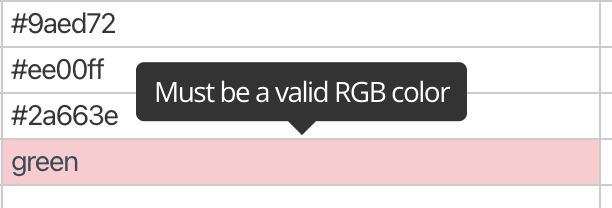 You can add validation to a field using the `validators` parameter—an array of objects, each with a `validate` rule. Optionally, include an `errorMessage` to show users a custom tooltip when validation fails.
## Validators
### Required
You can add validation to a field using the `validators` parameter—an array of objects, each with a `validate` rule. Optionally, include an `errorMessage` to show users a custom tooltip when validation fails.
## Validators
### Required
Specifies that the field cannot be empty.
Custom error message to display when validation fails.
### Unique
Specifies that all non-empty values in the column must be distinct (non-equal).
You can also validate uniqueness case-insensitively with `{ validate: "unique_case_insensitive" }`.
Custom error message to display when validation fails.
### Unique Across Multiple Fields
The `unique_with` validator can be used to validate uniqueness across multiple fields.
A unique identifier shared across all fields that should be validated together for uniqueness.
Custom error message to display when validation fails.
The `unique_with` validator can be used to validate uniqueness across multiple fields.
To use it, place a `unique_with` validator on each field that you want to be part of the uniqueness validation, all sharing the same `uniqueKey`.
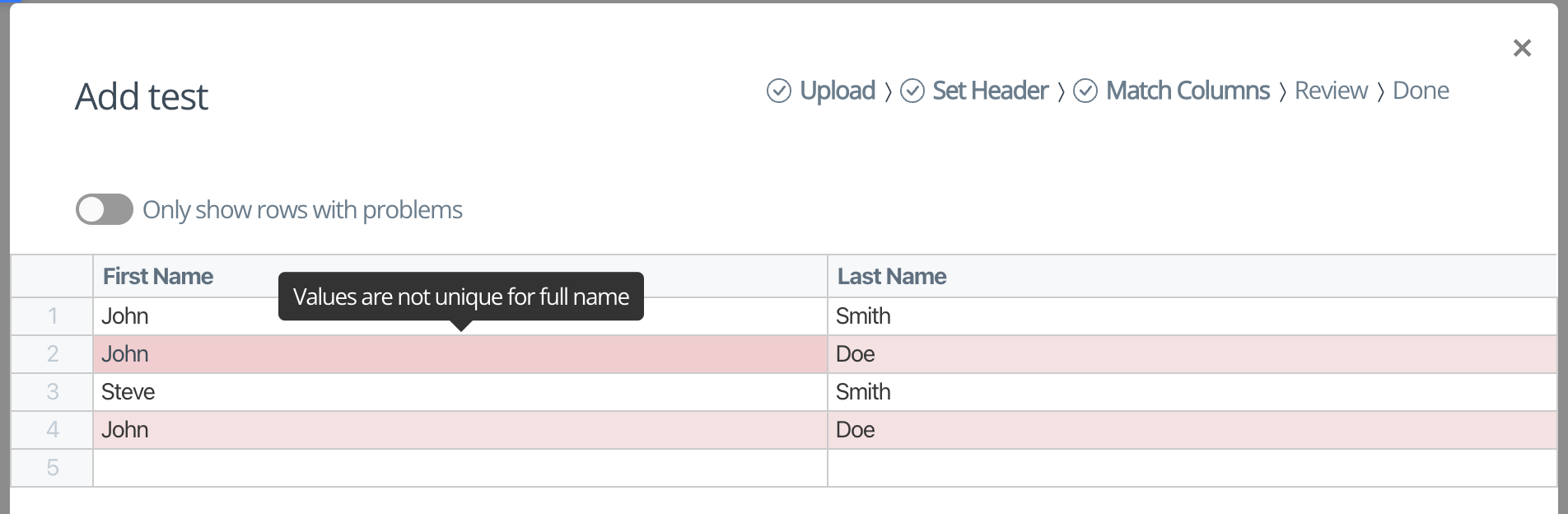
Here is an example set of fields using `unique_with` validators used to validate that the combination of the first name and last name fields are unique.
```javascript theme={null}
[
{
label: "First Name",
key: "firstName",
validators: [
{
validate: "unique_with",
uniqueKey: "full name",
},
],
},
{
label: "Last Name",
key: "lastName",
validators: [
{
validate: "unique_with",
uniqueKey: "full name",
},
],
},
]
```
And here is an example of the validators in action:
### Match a Regular Expression
You can validate that a field matches the given regular expression with the `regex_match` validator.
Conversely, you can validate that a field does *not* match a regular expression with the `regex_exclude` validator.
The regular expression pattern to match against.
Optional regex configuration options.
Custom error message to display when validation fails.
The Dromo uploader uses standard JavaScript regular expressions. You can set the `regex` key as either a `RegExp` literal/object or a string.
If you choose to use a string, be careful to properly escape special characters in your regex. For example, the regex `/^"\d+"$/` should be passed in as `"^\"\\d+\"$"`. Additionally, if using a string, note that you cannot pass in regex flags directly in your regex. Instead, you may optionally provide a `regexOptions` parameter with the validator which takes an object with the following keys:
* `ignoreCase: boolean` - Case insensitive flag (regex flag `i`)
* `dotAll: boolean` - Matches all including any line breaks (regex flag `s`)
* `multiline: boolean` - Multiline flag (regex flag `m`)
* `unicode: boolean` - Unicode flag (regex flag `u`)
### Require with Other Fields
You can use these validators to require that a field be non-empty *only if* other fields are present or empty. There are four variations.
Array of field keys to check against.
Custom error message to display when validation fails.
You can use these validators to require that a field be non-empty *only if* other fields are present or empty. There are four variations:
> `{ validate: "require_with", fields: [, ...] }`
This will require that the field has a value if **any** of the fields listed in the `fields` array are **non-empty**.
> `{ validate: "require_without", fields: [, ...] }`
This will require that the field has a value if **any** of the fields listed in the `fields` array are **empty**.
> `{ validate: "require_with_all", fields: [, ...] }`
This will require that the field has a value if **all** of the fields listed in the `fields` array are **non-empty**.
> `{ validate: "require_without_all", fields: [, ...] }`
This will require that the field has a value if **all** of the fields listed in the `fields` array are **empty**.
### Require with Other Field Values
You can use these validators to require that a field be non-empty *only if* other fields have specific values. There are four variations.
Object mapping field keys to their required values.
Custom error message to display when validation fails.
You can use these validators to require that a field be non-empty *only if* other fields have specific values. There are four variations:
> `{ validate: "require_with_values", fieldValues: { : , ... } }`
This will require that the field has a value if **any** of the fields contain the corresponding value specified under `fieldValues`.
> `{ validate: "require_without_values", fieldValues: { : , ... } }`
This will require that the field has a value if **any** of the fields **do not** contain the corresponding value specified under `fieldValues`.
> `{ validate: "require_with_all_values", fieldValues: { : , ... } }`
This will require that the field has a value if **all** of the fields contain the corresponding value specified under `fieldValues`.
> `{ validate: "require_without_all_values", fieldValues: { : , ... } }`
This will require that the field has a value if **all** of the fields **do not** contain the corresponding value specified under `fieldValues`.
### Length
Validates that a field's value falls within a minimum or maximum number of characters.
Either min, max, or both must be defined. Values are inclusive.
The length validator cannot be used with non-string-based fields, such as number or date fields.
Minimum number of characters allowed.
Maximum number of characters allowed.
Custom error message to display when validation fails.
### Alphabetical
Validates that a field's value only contains alphabetical characters (a-z, lowercase and uppercase).
Custom error message to display when validation fails.