> ## Documentation Index
> Fetch the complete documentation index at: https://developer.dromo.io/llms.txt
> Use this file to discover all available pages before exploring further.
# Mapping Multiple Columns to a Single Field
This guide demonstrates how to use field setting to map multiple columns to a single field.
For more detail about the `manyToOne` setting, see the [reference](/fields#manyToOne) page.
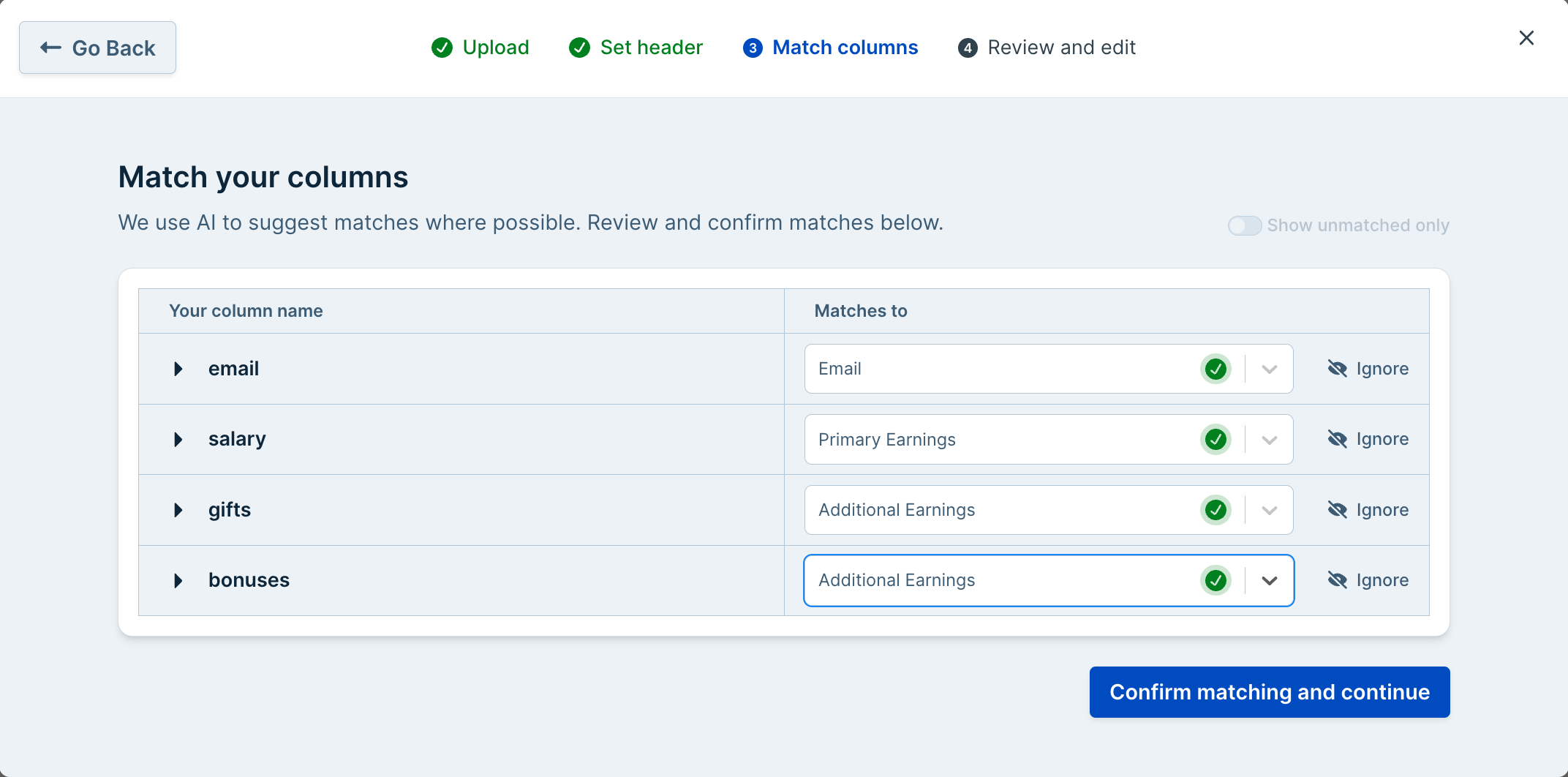
Suppose we're collecting tax information: `email`, `primary_earnings`, and optional `additional_earnings`. Users upload spreadsheets with these columns, though the number of `additional_earnings` columns may vary. We'll map them all to a single `additional_earnings` field and validate all earnings as USD currency.
## Field Configuration
Adding the property `manyToOne` with the value `true` enables many to one mapping.
```javascript JavaScript theme={null}
export const fields = [
{
label: 'Email',
key: 'email',
type: 'email'
},
{
label: 'Primary Earnings',
key: 'primary_earnings',
type: ['number', 'usd'],
},
{
label: 'Additional Earnings',
key: 'additional_earnings',
type: ['number', 'usd'],
manyToOne: true,
},
];
```
```jsx React theme={null}
Import Earnings
```
With this setting enabled, a user will be able to choose multiple columns and match them to the field without error.
 ## Data Review Screen
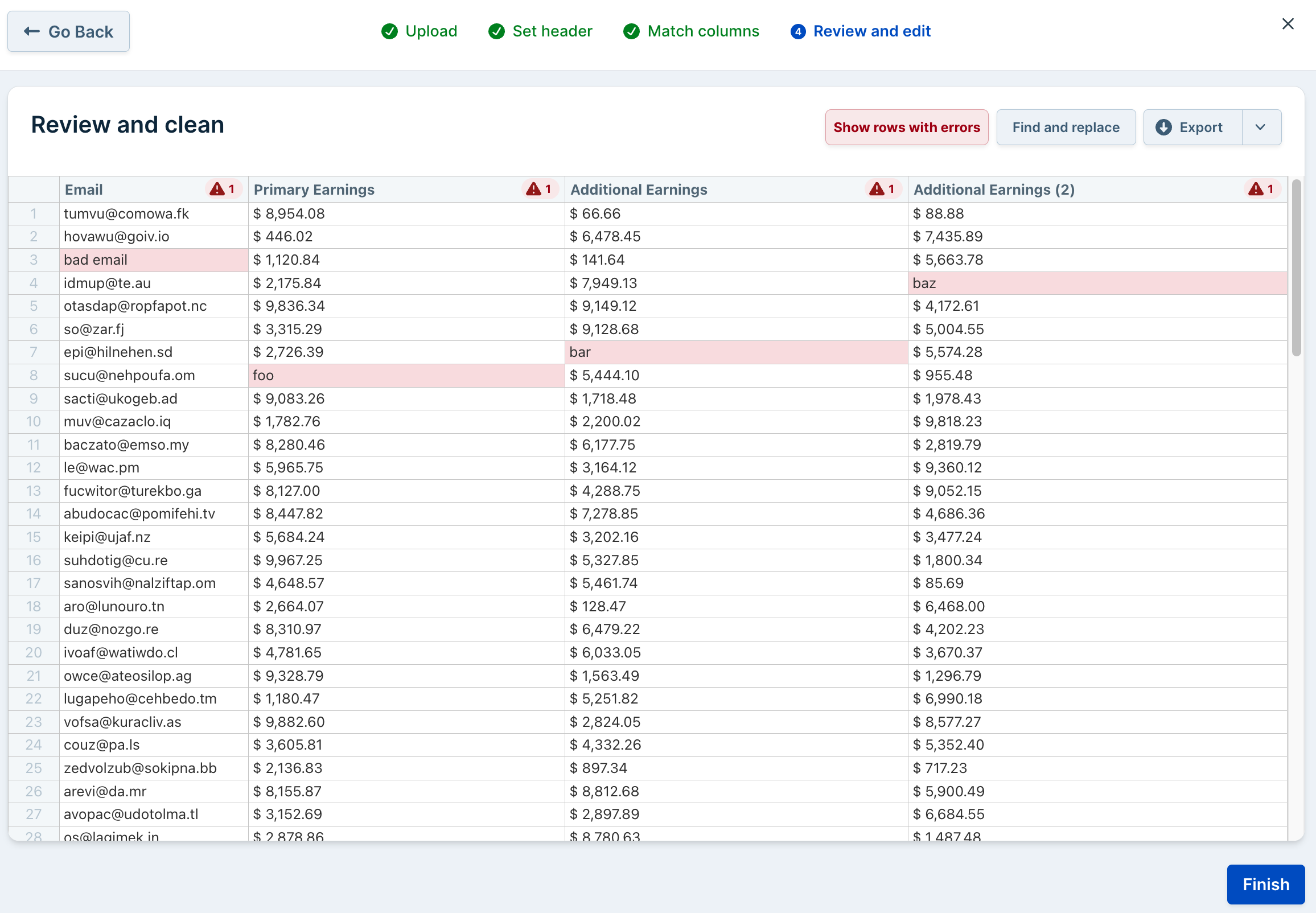
With multiple columns mapped to one field, all the columns will have the label with a number indicating their order.
Note that validations defined in a `manyToOne` field apply to all mapped columns.
## Data Review Screen
With multiple columns mapped to one field, all the columns will have the label with a number indicating their order.
Note that validations defined in a `manyToOne` field apply to all mapped columns.
 ## Results
Upon successful import, the [results and metadata](/reference/results#the-onresults-callback) include all the values from the mapped columns and metadata indicating how the columns were mapped to the target schema.
### Result Data
Each value from a `manyToOne` column appear in an array that is the value for the `manyToOne` field's key.
```json theme={null}
[
{
"email": "tumvu@comowa.fk",
"primary_earnings": 8954.08,
"additional_earnings": [
66.66,
88.88
]
},
{
"email": "hovawu@goiv.io",
"primary_earnings": 446.02,
"additional_earnings": [
6478.45,
7435.89
]
},
{
"email": "idmup@te.au",
"primary_earnings": 2175.84,
"additional_earnings": [
7949.13,
1998.52
]
}
...
]
```
### Result Metadata
The result metadata indicates which columns from the source file were mapped to which columns.
```json theme={null}
{
"id": null,
"filename": "earnings.csv",
"importIdentifier": "earnings",
"user": {
"id": "testUser"
},
"rowsWithError": [],
"rawHeaders": [
"email",
"salary",
"gifts",
"bonuses"
],
"fields": {
"email": {
"fileHeaderIndex": 0,
"fileHeader": "email",
"isCustom": false,
"manyToOne": false
},
"primary_earnings": {
"fileHeaderIndex": 1,
"fileHeader": "salary",
"isCustom": false,
"manyToOne": false
},
"additional_earnings": {
"fileHeader": null,
"fileHeaders": [
"gifts",
"bonuses"
],
"fileHeaderIndex": null,
"fileHeaderIndexes": [
2,
3
],
"isCustom": false,
"manyToOne": true
}
},
"errors": []
}
```
## Hooks
### Row Hook
`manyToOne` fields can have their values changed and their info messages and validations set in [row hooks](/reference/hooks#row-hooks).
```javascript JavaScript theme={null}
dromo.registerRowHook(function (record) {
if (record.index !== 2) return record;
record.row.additional_earnings.manyToOne![0].value = 42.0;
record.row.additional_earnings.manyToOne![1].info = [
{ level: "error", message: "Invalid additional earning" },
];
return record;
});
```
```jsx React theme={null}
{
if (record.index !== 2) return record;
record.row.additional_earnings.manyToOne![0].value = 42.0;
record.row.additional_earnings.manyToOne![1].info = [
{ level: "error", message: "Invalid additional earning" },
];
return record;
}
]}
...>
Import Earnings
```
### Column Hooks
For `manyToOne` fields, a [column hook](/reference/hooks#column-hooks) callback registered for a `manyToOne` field will be invoked once for every mapped column.
```javascript JavaScript theme={null}
dromo.registerColumnHook("additional_earnings", (values) => {
// Cap additional earnings at $5,000
return values.map((v) => {
if (v.value > 5000) {
return {
...v,
value: 5000,
info: [{ level: "info", message: "capped at $5000" }],
};
} else return v;
});
});
```
```jsx React theme={null}
{
// Cap additional earnings at $5,000
return values.map((v) => {
if (v.value > 5000) {
return {
...v,
value: 5000,
info: [{ level: "info", message: "capped at $5000" }],
};
} else return v;
});
}
}]}
...>
Import Earnings
```
### Step Hooks
[Step hooks](/reference/hooks#step-hooks) `REVIEW_STEP` and `REVIEW_STEP_POST_HOOKS` can be used to inspect column mapping at run time to see which columns were mapped to `oneToMany` fields.
The full data object supplied as an argument to the step hook will resemble this:
```json theme={null}
{
"fields": {
"email": {
"fileHeaderIndex": 0,
"fileHeader": "email",
"isCustom": false,
"manyToOne": false
},
"primary_earnings": {
"fileHeaderIndex": 1,
"fileHeader": "salary",
"isCustom": false,
"manyToOne": false
},
"additional_earnings": {
"fileHeader": null,
"fileHeaders": [
"gifts",
"bonuses"
],
"fileHeaderIndex": null,
"fileHeaderIndexes": [
2,
3
],
"isCustom": false,
"manyToOne": true
}
},
"rawHeaders": [
"email",
"salary",
"gifts",
"bonuses"
],
"headerMapping": {
"email": "email",
"salary": "primary_earnings",
"gifts": "additional_earnings",
"bonuses": "additional_earnings"
}
}
```
So in code:
```javascript JavaScript theme={null}
...
dromo.registerStepHook("REVIEW_STEP", (_uploader, data) => {
console.log("manyToOne file headers", data.fields.additional_earnings.fileHeaders);
// ["gifts", "bonuses"]
console.log("manyToOne file indexes", data.fields.additional_earnings.fileHeaderIndexes);
// [2, 3]
});
...
```
```jsx React theme={null}
{
console.log("manyToOne file headers", data.fields.additional_earnings.fileHeaders);
// ["gifts", "bonuses"]
console.log("manyToOne file indexes", data.fields.additional_earnings.fileHeaderIndexes);
// [2, 3]
}
}
]}
...>
Import Earnings
```
## Results
Upon successful import, the [results and metadata](/reference/results#the-onresults-callback) include all the values from the mapped columns and metadata indicating how the columns were mapped to the target schema.
### Result Data
Each value from a `manyToOne` column appear in an array that is the value for the `manyToOne` field's key.
```json theme={null}
[
{
"email": "tumvu@comowa.fk",
"primary_earnings": 8954.08,
"additional_earnings": [
66.66,
88.88
]
},
{
"email": "hovawu@goiv.io",
"primary_earnings": 446.02,
"additional_earnings": [
6478.45,
7435.89
]
},
{
"email": "idmup@te.au",
"primary_earnings": 2175.84,
"additional_earnings": [
7949.13,
1998.52
]
}
...
]
```
### Result Metadata
The result metadata indicates which columns from the source file were mapped to which columns.
```json theme={null}
{
"id": null,
"filename": "earnings.csv",
"importIdentifier": "earnings",
"user": {
"id": "testUser"
},
"rowsWithError": [],
"rawHeaders": [
"email",
"salary",
"gifts",
"bonuses"
],
"fields": {
"email": {
"fileHeaderIndex": 0,
"fileHeader": "email",
"isCustom": false,
"manyToOne": false
},
"primary_earnings": {
"fileHeaderIndex": 1,
"fileHeader": "salary",
"isCustom": false,
"manyToOne": false
},
"additional_earnings": {
"fileHeader": null,
"fileHeaders": [
"gifts",
"bonuses"
],
"fileHeaderIndex": null,
"fileHeaderIndexes": [
2,
3
],
"isCustom": false,
"manyToOne": true
}
},
"errors": []
}
```
## Hooks
### Row Hook
`manyToOne` fields can have their values changed and their info messages and validations set in [row hooks](/reference/hooks#row-hooks).
```javascript JavaScript theme={null}
dromo.registerRowHook(function (record) {
if (record.index !== 2) return record;
record.row.additional_earnings.manyToOne![0].value = 42.0;
record.row.additional_earnings.manyToOne![1].info = [
{ level: "error", message: "Invalid additional earning" },
];
return record;
});
```
```jsx React theme={null}
{
if (record.index !== 2) return record;
record.row.additional_earnings.manyToOne![0].value = 42.0;
record.row.additional_earnings.manyToOne![1].info = [
{ level: "error", message: "Invalid additional earning" },
];
return record;
}
]}
...>
Import Earnings
```
### Column Hooks
For `manyToOne` fields, a [column hook](/reference/hooks#column-hooks) callback registered for a `manyToOne` field will be invoked once for every mapped column.
```javascript JavaScript theme={null}
dromo.registerColumnHook("additional_earnings", (values) => {
// Cap additional earnings at $5,000
return values.map((v) => {
if (v.value > 5000) {
return {
...v,
value: 5000,
info: [{ level: "info", message: "capped at $5000" }],
};
} else return v;
});
});
```
```jsx React theme={null}
{
// Cap additional earnings at $5,000
return values.map((v) => {
if (v.value > 5000) {
return {
...v,
value: 5000,
info: [{ level: "info", message: "capped at $5000" }],
};
} else return v;
});
}
}]}
...>
Import Earnings
```
### Step Hooks
[Step hooks](/reference/hooks#step-hooks) `REVIEW_STEP` and `REVIEW_STEP_POST_HOOKS` can be used to inspect column mapping at run time to see which columns were mapped to `oneToMany` fields.
The full data object supplied as an argument to the step hook will resemble this:
```json theme={null}
{
"fields": {
"email": {
"fileHeaderIndex": 0,
"fileHeader": "email",
"isCustom": false,
"manyToOne": false
},
"primary_earnings": {
"fileHeaderIndex": 1,
"fileHeader": "salary",
"isCustom": false,
"manyToOne": false
},
"additional_earnings": {
"fileHeader": null,
"fileHeaders": [
"gifts",
"bonuses"
],
"fileHeaderIndex": null,
"fileHeaderIndexes": [
2,
3
],
"isCustom": false,
"manyToOne": true
}
},
"rawHeaders": [
"email",
"salary",
"gifts",
"bonuses"
],
"headerMapping": {
"email": "email",
"salary": "primary_earnings",
"gifts": "additional_earnings",
"bonuses": "additional_earnings"
}
}
```
So in code:
```javascript JavaScript theme={null}
...
dromo.registerStepHook("REVIEW_STEP", (_uploader, data) => {
console.log("manyToOne file headers", data.fields.additional_earnings.fileHeaders);
// ["gifts", "bonuses"]
console.log("manyToOne file indexes", data.fields.additional_earnings.fileHeaderIndexes);
// [2, 3]
});
...
```
```jsx React theme={null}
{
console.log("manyToOne file headers", data.fields.additional_earnings.fileHeaders);
// ["gifts", "bonuses"]
console.log("manyToOne file indexes", data.fields.additional_earnings.fileHeaderIndexes);
// [2, 3]
}
}
]}
...>
Import Earnings
```