> ## Documentation Index
> Fetch the complete documentation index at: https://developer.dromo.io/llms.txt
> Use this file to discover all available pages before exploring further.
# Importing a PDF table with a Custom Parser
## Overview
In this guide, we'll build a [custom file parser](/reference/custom-file-parsers) to support PDF uploads using the PDFTables API to extract tables from PDFs.
## Getting Started
For our example we're importing users from a table in a PDF document.
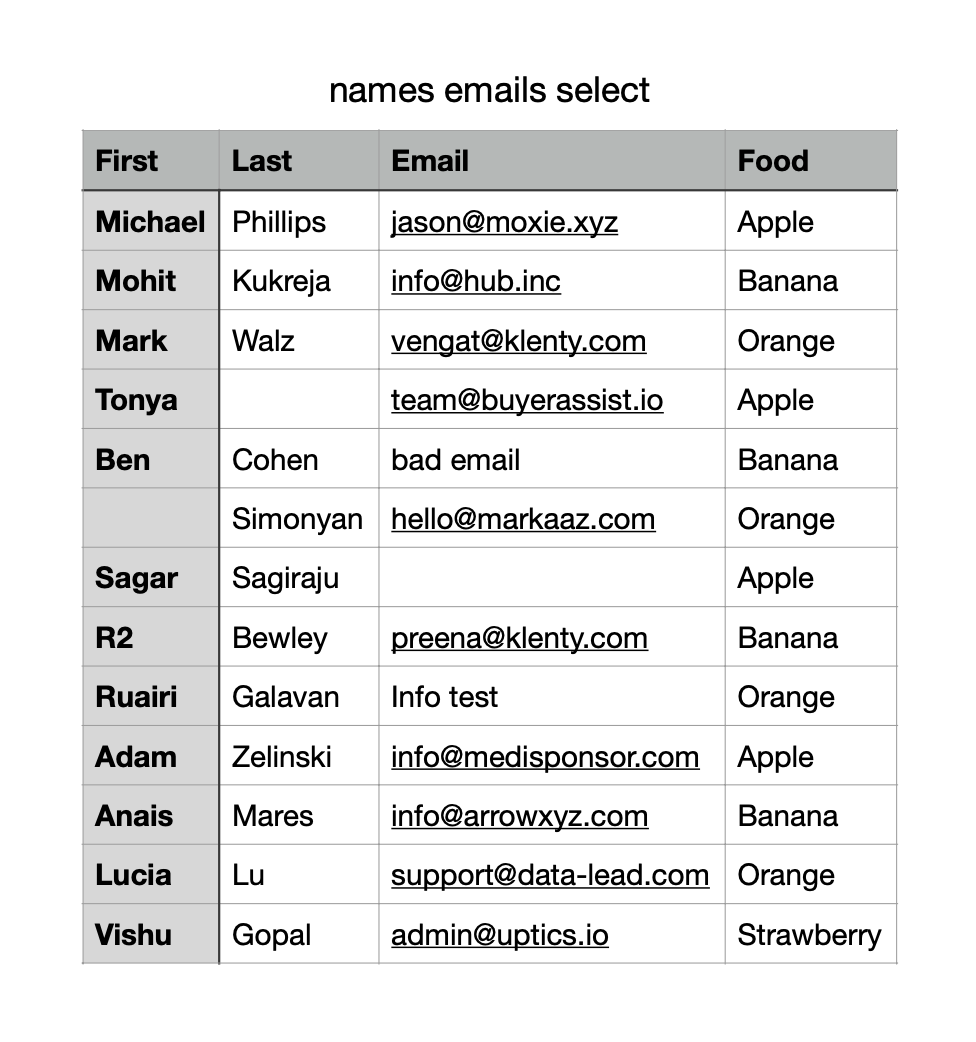 We'll rely on [PDFTables](https://pdftables.com/) API to parse the PDF into a CSV string. Once we have a CSV string, we'll use an additional external library, [PapaParse](https://www.papaparse.com/), to parse the CSV string into a two dimensional array of data for Dromo to receive.
To use this demo you'll need to get your own [paid API key from PDFTables](https://pdftables.com/pricing).
## Adding the Custom Parser to Dromo
Dromo provides an [interface for implementing custom file parsing](/reference/custom-file-parsers). We need to specify the file extension(s) and the parsing logic that will be used to parse the file.
```javascript JavaScript theme={null}
...
const dromo = new DromoUploader("FRONTEND_API_KEY", fields, settings, user);
dromo.registerFileParser({
extensions: ["pdf"],
parseFile: async (buffer, fileName) => {
...
},
});
```
```jsx React theme={null}
...
{
...
},
},
]}>
Import Users
```
## Implementing PDF Parsing Logic
Dromo passes a `buffer: ArrayBuffer` and `fileName: string` to the `parseFile` callback. We will use the buffer to create a file that we can `POST` to the PDFTables API.
```javascript theme={null}
async (buffer, fileName) => {
const myPDFTablesAPIKey = "";
const url = `https://pdftables.com/api?key=${myPDFTablesAPIKey}&format=csv`;
const formData = new FormData();
formData.append("file", new Blob([buffer]), fileName);
const response = await fetch(url, {
method: "POST",
body: formData,
});
// text data response is a CSV string
const data = await response.text();
...
};
```
If successful, the `response.text()` will contain a CSV string. Like this:
```text theme={null}
'my_filename,,,\nFirst,Last,Email,Food\nMichael,Phillips,jason@moxie.xyz,Apple\nMohit,Kukreja,info@hub.inc,Banana\nMark,Walz,vengat@klenty.com,Orange\nTonya,,team@buyerassist.io,Apple\nBen,Cohen,bad email,Banana\n,Simonyan,hello@markaaz.com,Orange\nSagar,Sagiraju,,Apple\nR2,Bewley,preena@klenty.com,Banana\nRuairi,Galavan,Info test,Orange\nAdam,Zelinski,info@medisponsor.com,Apple\nAnais,Mares,info@arrowxyz.com,Banana\nLucia,Lu,support@data-lead.com,Orange\nVishu,Gopal,admin@uptics.io,Strawberry\n1,,,\n'
```
We need to convert this in to a two dimensional array. We'll use [PapaParse](https://www.papaparse.com/), a free package, to convert the string to the desired format.
```javascript theme={null}
import Papa from "papaparse";
...
// text data response is a CSV string
const data = await response.text();
// 'names email select,,,\nFirst,Last,Email,Food\nMichael,Phillips...'
const lines = Papa.parse(data).data as string[][];
// [['names email select', '', '', ''], ['First', 'Last', 'Email', 'Food'], ['Michael', 'Phillips', 'jason@moxie.xyz', 'Apple']...]
...
```
Ensure that every line in the two dimensional array is the same length, then return the data.
```javascript theme={null}
const maxLen = Math.max(...lines.map((row) => row.length));
const result = lines.map((row) => {
const padding = Array(maxLen - row.length).fill("");
return [...row, ...padding];
});
return result;
```
We're done! Let's try it in Dromo and see how it works.
Open the Dromo importer and observe the file extensions now include 'pdf'.
We'll rely on [PDFTables](https://pdftables.com/) API to parse the PDF into a CSV string. Once we have a CSV string, we'll use an additional external library, [PapaParse](https://www.papaparse.com/), to parse the CSV string into a two dimensional array of data for Dromo to receive.
To use this demo you'll need to get your own [paid API key from PDFTables](https://pdftables.com/pricing).
## Adding the Custom Parser to Dromo
Dromo provides an [interface for implementing custom file parsing](/reference/custom-file-parsers). We need to specify the file extension(s) and the parsing logic that will be used to parse the file.
```javascript JavaScript theme={null}
...
const dromo = new DromoUploader("FRONTEND_API_KEY", fields, settings, user);
dromo.registerFileParser({
extensions: ["pdf"],
parseFile: async (buffer, fileName) => {
...
},
});
```
```jsx React theme={null}
...
{
...
},
},
]}>
Import Users
```
## Implementing PDF Parsing Logic
Dromo passes a `buffer: ArrayBuffer` and `fileName: string` to the `parseFile` callback. We will use the buffer to create a file that we can `POST` to the PDFTables API.
```javascript theme={null}
async (buffer, fileName) => {
const myPDFTablesAPIKey = "";
const url = `https://pdftables.com/api?key=${myPDFTablesAPIKey}&format=csv`;
const formData = new FormData();
formData.append("file", new Blob([buffer]), fileName);
const response = await fetch(url, {
method: "POST",
body: formData,
});
// text data response is a CSV string
const data = await response.text();
...
};
```
If successful, the `response.text()` will contain a CSV string. Like this:
```text theme={null}
'my_filename,,,\nFirst,Last,Email,Food\nMichael,Phillips,jason@moxie.xyz,Apple\nMohit,Kukreja,info@hub.inc,Banana\nMark,Walz,vengat@klenty.com,Orange\nTonya,,team@buyerassist.io,Apple\nBen,Cohen,bad email,Banana\n,Simonyan,hello@markaaz.com,Orange\nSagar,Sagiraju,,Apple\nR2,Bewley,preena@klenty.com,Banana\nRuairi,Galavan,Info test,Orange\nAdam,Zelinski,info@medisponsor.com,Apple\nAnais,Mares,info@arrowxyz.com,Banana\nLucia,Lu,support@data-lead.com,Orange\nVishu,Gopal,admin@uptics.io,Strawberry\n1,,,\n'
```
We need to convert this in to a two dimensional array. We'll use [PapaParse](https://www.papaparse.com/), a free package, to convert the string to the desired format.
```javascript theme={null}
import Papa from "papaparse";
...
// text data response is a CSV string
const data = await response.text();
// 'names email select,,,\nFirst,Last,Email,Food\nMichael,Phillips...'
const lines = Papa.parse(data).data as string[][];
// [['names email select', '', '', ''], ['First', 'Last', 'Email', 'Food'], ['Michael', 'Phillips', 'jason@moxie.xyz', 'Apple']...]
...
```
Ensure that every line in the two dimensional array is the same length, then return the data.
```javascript theme={null}
const maxLen = Math.max(...lines.map((row) => row.length));
const result = lines.map((row) => {
const padding = Array(maxLen - row.length).fill("");
return [...row, ...padding];
});
return result;
```
We're done! Let's try it in Dromo and see how it works.
Open the Dromo importer and observe the file extensions now include 'pdf'.
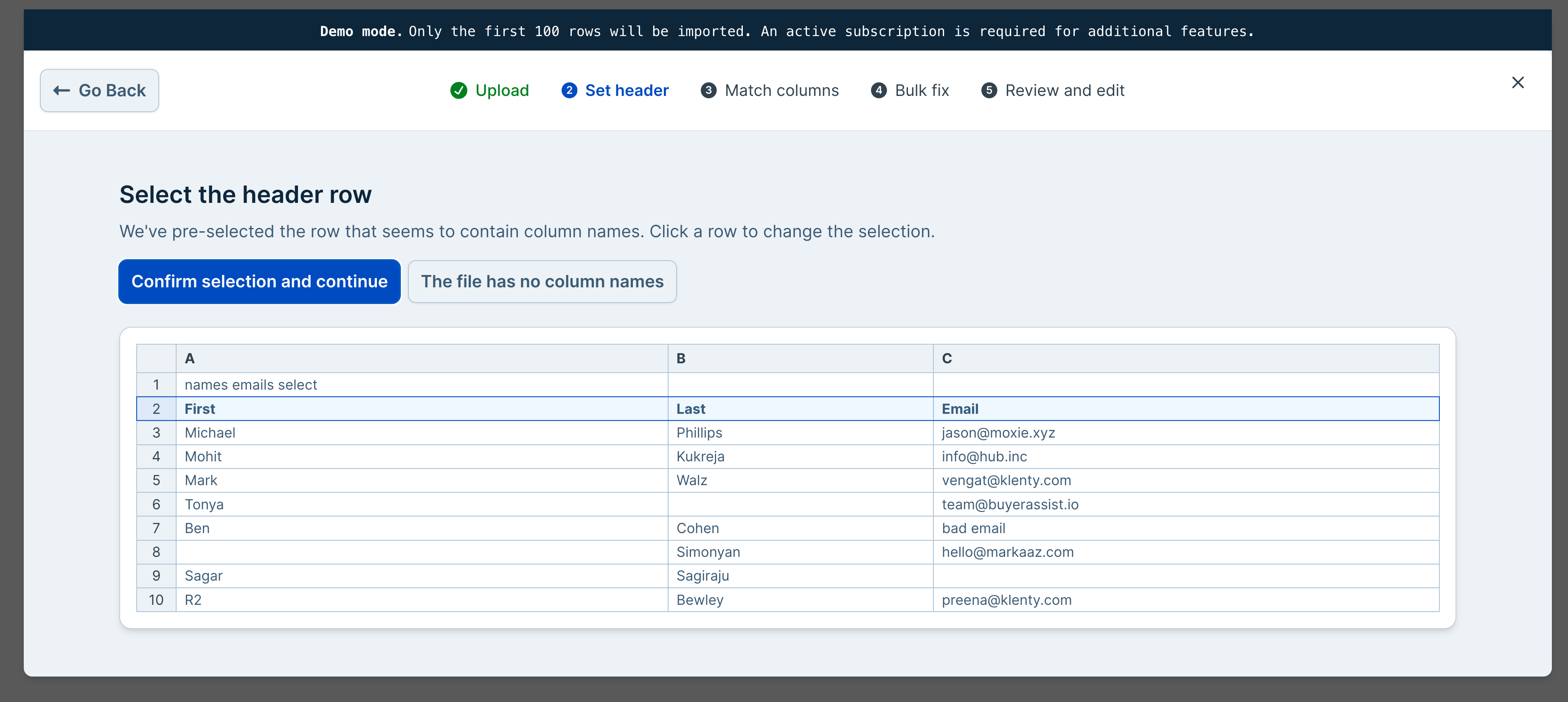
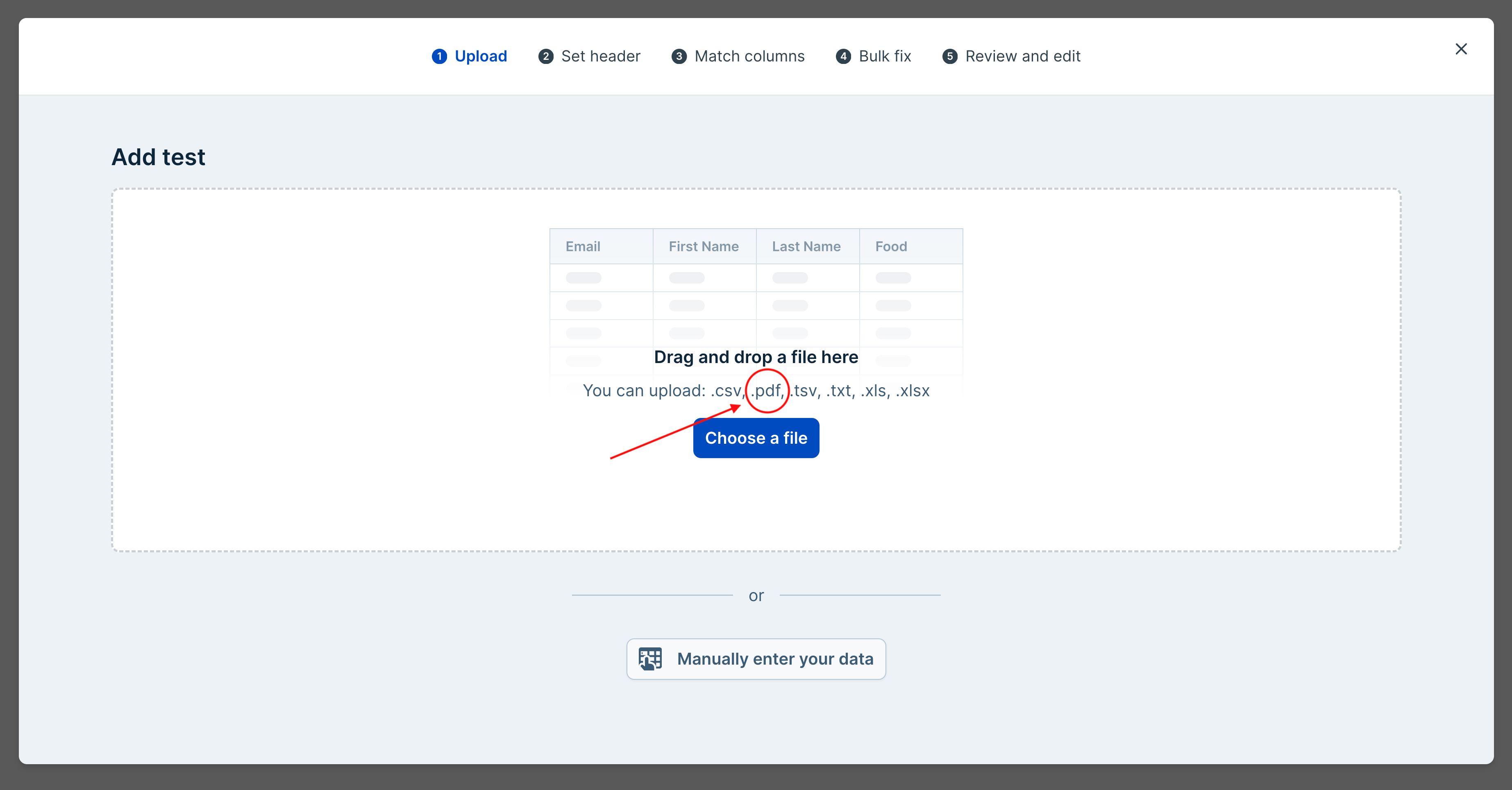 Drag and drop your PDF test file. Your data should be properly parsed and loaded.
 ## Full Complete Demo
```javascript JavaScript theme={null}
// Using PapaParse https://www.papaparse.com/ to parse the CSV string
import Papa from "papaparse";
const fields = [
{
label: "Email",
key: "email",
type: "email",
},
{
label: "First Name",
key: "firstName",
},
{
label: "Last Name",
key: "lastName",
},
{
label: "Food",
key: "food",
type: "select",
selectOptions: [
{ label: "Apple", value: "Apple" },
{ label: "Banana", value: "Banana" },
{ label: "Orange", value: "Orange" },
{ label: "Strawberry", value: "Strawberry" },
],
},
];
const settings = {
importIdentifier: "Custom Parser Example",
};
const user = {
id: "12345",
};
const dromo = new DromoUploader("FRONTEND_API_KEY", fields, settings, user);
dromo.registerFileParser({
extensions: ["pdf"],
parseFile: async (buffer, fileName) => {
const myPDFTablesAPIKey = "";
const url = `https://pdftables.com/api?key=${myPDFTablesAPIKey}&format=csv`;
const formData = new FormData();
formData.append("file", new Blob([buffer]), fileName);
const response = await fetch(url, {
method: "POST",
body: formData,
});
// text data response is a CSV string
const data = await response.text();
const lines = Papa.parse(data).data as string[][];
// Pad the lines to ensure they're all the same length
const maxLen = Math.max(...lines.map((row) => row.length));
const result = lines.map((row) => {
const padding = Array(maxLen - row.length).fill("");
return [...row, ...padding];
});
return result;
},
});
```
```jsx React theme={null}
// Using PapaParse https://www.papaparse.com/ to parse the CSV string
import Papa from "papaparse";
...
{
const myPDFTablesAPIKey = "";
const url = `https://pdftables.com/api?key=${myPDFTablesAPIKey}&format=csv`;
const formData = new FormData();
formData.append("file", new Blob([buffer]), fileName);
const response = await fetch(url, {
method: "POST",
body: formData,
});
// text data response is a CSV string
const data = await response.text();
const lines = Papa.parse(data).data as string[][];
// Pad the lines to ensure they're all the same length
const maxLen = Math.max(...lines.map((row) => row.length));
const result = lines.map((row) => {
const padding = Array(maxLen - row.length).fill("");
return [...row, ...padding];
});
return result;
},
},
]}>
Import Users
```
## Full Complete Demo
```javascript JavaScript theme={null}
// Using PapaParse https://www.papaparse.com/ to parse the CSV string
import Papa from "papaparse";
const fields = [
{
label: "Email",
key: "email",
type: "email",
},
{
label: "First Name",
key: "firstName",
},
{
label: "Last Name",
key: "lastName",
},
{
label: "Food",
key: "food",
type: "select",
selectOptions: [
{ label: "Apple", value: "Apple" },
{ label: "Banana", value: "Banana" },
{ label: "Orange", value: "Orange" },
{ label: "Strawberry", value: "Strawberry" },
],
},
];
const settings = {
importIdentifier: "Custom Parser Example",
};
const user = {
id: "12345",
};
const dromo = new DromoUploader("FRONTEND_API_KEY", fields, settings, user);
dromo.registerFileParser({
extensions: ["pdf"],
parseFile: async (buffer, fileName) => {
const myPDFTablesAPIKey = "";
const url = `https://pdftables.com/api?key=${myPDFTablesAPIKey}&format=csv`;
const formData = new FormData();
formData.append("file", new Blob([buffer]), fileName);
const response = await fetch(url, {
method: "POST",
body: formData,
});
// text data response is a CSV string
const data = await response.text();
const lines = Papa.parse(data).data as string[][];
// Pad the lines to ensure they're all the same length
const maxLen = Math.max(...lines.map((row) => row.length));
const result = lines.map((row) => {
const padding = Array(maxLen - row.length).fill("");
return [...row, ...padding];
});
return result;
},
});
```
```jsx React theme={null}
// Using PapaParse https://www.papaparse.com/ to parse the CSV string
import Papa from "papaparse";
...
{
const myPDFTablesAPIKey = "";
const url = `https://pdftables.com/api?key=${myPDFTablesAPIKey}&format=csv`;
const formData = new FormData();
formData.append("file", new Blob([buffer]), fileName);
const response = await fetch(url, {
method: "POST",
body: formData,
});
// text data response is a CSV string
const data = await response.text();
const lines = Papa.parse(data).data as string[][];
// Pad the lines to ensure they're all the same length
const maxLen = Math.max(...lines.map((row) => row.length));
const result = lines.map((row) => {
const padding = Array(maxLen - row.length).fill("");
return [...row, ...padding];
});
return result;
},
},
]}>
Import Users
```